


NewsNation
3.3491.00 Reviews
App Specs
- Version
- Varies with Device
- Updated On
- License
- Free
- Downloads
- 100,000+
- Developer
- Nexstar Inc.
- Categories
- News & Magazines
- Platform
- Android, iOS
Screenshots
 Analysis by AppCompare
News rarely arrives when I have time to sit down and sort through several sources. I want a quick sense of what is happening, then a clear route to more detail if a story affects my day. NewsNation is a free news and magazines app from Nexstar Inc., and I see its best use as a straightforward place to check coverage and decide what deserves closer attention. Its 3.2 average from around 869 ratings suggests that readers’ experiences vary, so I would treat it as one useful source rather than expect it to suit every news habit.
Starting with a quick check-in
My practical routine is to open a news app during breakfast or while waiting for an appointment, scan the main screen, and choose one story rather than scroll indefinitely. NewsNation’s uncluttered presentation, as experienced in the published review below, suits that kind of short visit: the emphasis is on getting to news without first learning a complicated interface. It is rated for Everyone, which makes it broadly accessible, though the topics themselves can still be serious or upsetting.
For a busy reader, the useful question is not whether an app contains every possible story; it is whether it helps separate a quick overview from a deeper read. I would use this one to begin that process, then pause on a report that matters and look for the facts, context, and differing perspectives before forming a firm view. That habit is especially valuable with breaking news, when early accounts can change as more information emerges.
From headline to a more deliberate read
Once I spot a subject I care about, I try not to treat the headline as the whole story. A better workflow is to open the article, identify what is confirmed, notice what remains uncertain, and then decide whether I need another source. This is not a special tool in the app; it is a way of reading that keeps a fast news check from turning into an unexamined opinion. It also helps when a story is developing and a brief update may not yet answer the practical questions a reader has.
NewsNation can fit readers who want a general news destination rather than a feed built entirely around one interest. If I am following a national story, I can use it as a starting point, then compare the account with a local outlet for nearby consequences or a specialist publication for technical detail. That handoff matters: a national report may explain the broad event while a local newsroom is better placed to cover road closures, school decisions, or services in a particular area.
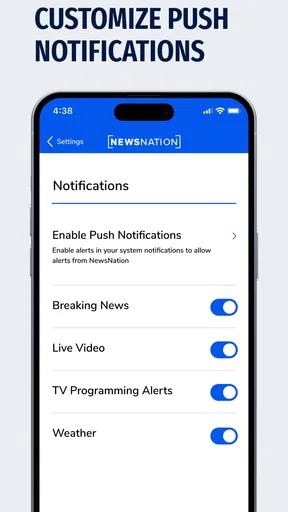
Notifications can be useful when I want a prompt about a topic, but I would keep them selective. A phone that buzzes for every developing story quickly trains me to ignore alerts altogether. Choosing only subjects I genuinely follow makes a notification more like a cue to check the full report than a demand to react instantly. If an alert interrupts work or family time, I can leave it for later; a headline is rarely a substitute for reading the story carefully.
Where it fits among news choices
Compared with a newspaper’s app, which may go deeper into its own editorial strengths, or an aggregator that gathers headlines from many publishers, NewsNation is a more focused destination for its own coverage. That can be convenient when I want a single place to begin, but it is not the same as a broad comparison of viewpoints. I would not use any one outlet as my only source for a contentious issue. Pairing its coverage with local reporting or a publication with relevant subject expertise gives me a better check on what is emphasized and what context may be missing.
Worth Reading Before You Choose

EA SPORTS FC Mobile 26 Is a Bigger Football Game, but It Takes Time

Flipboard Shows What News Apps Must Do Beyond the Feed

Switching to Android Auto Means Rethinking Your Driving Routine

Google Calendar Makes a Crowded Week Easier to Manage

Ludo King Makes the Most of the Minutes Between Plans

Baby Panda World Brings Quick Play to Modern Phones, but Its Game Library Feels Busy
The app is most suitable for someone who wants a simple way to keep an eye on general news and is comfortable following one broadcaster’s reporting as one part of a wider routine. It is less suitable for a reader who expects a fully customized, multi-publisher briefing or needs specialized coverage in depth. In those cases, an aggregator or a dedicated local or trade publication may be a better primary choice. The right comparison depends on the task: quick awareness, local detail, and expert analysis are different needs.
A routine that turns information into action
Imagine I am making plans for the day and see a developing report that could affect travel or a public service. I would read beyond the alert, note whether the article gives a confirmed location and timing, and check a relevant local source before changing plans. If the story is important but still unfolding, I would revisit it later rather than assume the first update is complete. In that workflow, NewsNation can provide an initial signal; the handoff to a local authority or specialist source is what makes the information actionable.
That distinction is a useful trade-off. A general news app can help me notice a story I might otherwise miss, but it cannot replace checking the source best suited to a specific decision. For a personal safety issue, travel disruption, or local event, I would verify details with the organization responsible for that information. For a complex policy or science story, I would seek a specialist explanation as well. The app works better as a starting point than as a final answer to every question.
There is also a pace question. A live news stream can help when I want continuous coverage, but it is not automatically the best format for understanding a complicated report. Watching in real time asks for more attention than reading a concise update, and a running broadcast may move on before I have absorbed a point. I would choose live viewing when immediacy matters and use written coverage when I want to stop, reread, or compare details at my own speed.
What to expect before making it a habit
NewsNation is free, so trying it does not require a purchase decision. It has more than 100,000 installs and was released on August 26, 2020. Those details establish that it has a continuing audience, but they do not tell me whether its editorial approach matches an individual reader’s preferences. I would spend a few days checking the subjects it covers and the way its reports distinguish confirmed facts from developing details before making it part of a daily routine.
A frequent concern with any news app is whether it will become noisy. My advice is to be deliberate about alerts and to decide in advance when to check the app, rather than opening it every time a notification appears. Another question is whether it can replace other sources. I would say no: it can be a convenient regular check-in, while local reporting, specialist publications, and direct public information remain important for particular questions.
The app also makes most sense for readers who prefer a quick mobile check to a long desktop session. If I need to research a subject thoroughly, I would keep notes, compare several credible accounts, and follow links or references presented in the reporting where appropriate. If I only need a broad awareness of the day’s news, a shorter visit may be enough. Knowing which of those jobs I am doing helps prevent casual browsing from being mistaken for complete research.
First Impressions and Interface
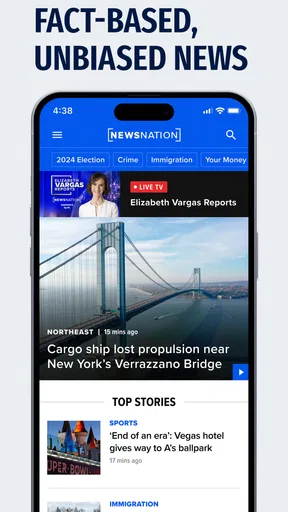
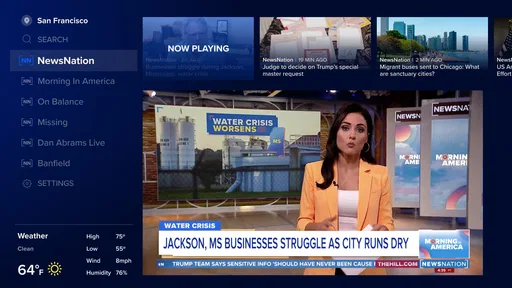
Upon opening NewsNation, the first thing that caught my eye was the clean and straightforward design. It’s like the app is saying, "Hey, we're all about the news, not the fluff." The layout is intuitive, with categories neatly organized at the top. You don't need to be a tech wizard to navigate through the app, which is a huge plus.
The color scheme is easy on the eyes, with a lot of whites and grays, and there’s a nice contrast that makes reading articles pleasant. One thing I loved was how fast everything loads. In a world where patience is a dying virtue, speed matters.
Content and Features
Now, let’s get to the meat of the app — the content. NewsNation offers a refreshing take on news coverage. It promises unbiased reporting, and from what I've seen, it delivers. The articles are well-researched, and there’s a good mix of breaking news, in-depth analysis, and lighter pieces to keep you informed without feeling overwhelmed.
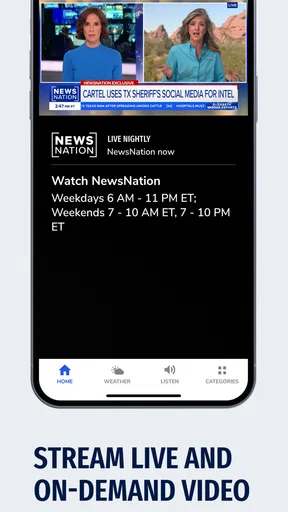
One feature that stands out is the "Live TV" option. Yes, you can stream live news directly from the app! It’s perfect for those moments when you want to catch up on the latest happenings in real-time. The streaming quality is solid, and I didn’t experience any buffering, even on my not-so-great Wi-Fi.
There's also a customizable notification setting, which I found super handy. You can choose to get alerts for only the topics that matter to you. So, if you're obsessed with tech news but couldn't care less about celebrity gossip, you're covered.
Personal Experience
Using NewsNation for a week, I found myself checking it more often than some of my other news apps. It’s like having a reliable friend who gives you the scoop without any drama. Whether I'm sipping my morning coffee or unwinding after a long day, the app has been a constant companion.
One thing I noticed was how the app manages to stay neutral. In a time when bias seems to seep into every corner of media, NewsNation feels like a breath of fresh air. It’s focused on facts, which is exactly what I need in a news app.
Conclusion
So, would I recommend NewsNation? Absolutely. If you’re tired of sensational headlines and just want straightforward news, this app is worth checking out. It combines simplicity with robust features, making it a great choice for anyone looking to stay informed.
In a digital world saturated with information, finding a reliable source is crucial. NewsNation offers that reliability, sprinkled with a user-friendly interface and a commitment to unbiased reporting. Whether you're a news junkie or just someone who wants to stay updated, this app has something to offer. Give it a try and see if it becomes your go-to news source too.
Pros
- User-friendly interface with easy navigation.
- Comprehensive news coverage from various sources.
- Customizable alerts for breaking news updates.
- High-quality streaming for live news broadcasts.
- Available on both Android and iOS platforms.
Cons
- Limited offline content access.
- Occasional ads can interrupt the experience.
- Some users report delayed notifications.
- May require a subscription for premium content.
- Limited international news coverage.
FAQs for NewsNation
What is NewsNation and what type of content does it offer?
NewsNation is a comprehensive news application providing users with real-time updates and in-depth coverage on a wide range of topics, including national and international news, politics, health, and entertainment. The app aims to deliver unbiased reporting, making it a reliable source for factual information. It offers both live streaming and on-demand content, ensuring users stay informed anytime, anywhere.
Is the NewsNation app free to use, or are there any subscription fees involved?
NewsNation is available as a free download on both Android and iOS platforms. However, while the app offers a substantial amount of content for free, there may be premium features or additional content that require a subscription. Users should check the app store description or the app’s settings for detailed information on any potential costs.
Does NewsNation offer personalized news feeds?
Yes, NewsNation provides a personalized news experience by allowing users to customize their news feed based on their interests and preferences. This feature ensures that users receive updates on topics they care about most, enhancing their overall experience. Users can adjust their settings within the app to tailor the content to their liking.
What are the technical requirements for installing NewsNation on my device?
To install NewsNation, users need a compatible Android or iOS device. The app requires Android version 5.0 or higher, or iOS 11.0 or later, ensuring it runs smoothly on most modern smartphones and tablets. Users should also ensure they have adequate storage space and a stable internet connection for optimal performance.
How does NewsNation ensure the accuracy and reliability of its news coverage?
NewsNation is committed to providing unbiased and factual reporting. The app employs a team of experienced journalists and editors who adhere to strict journalistic standards and ethics. Moreover, the platform often includes multiple viewpoints and sources to offer a balanced perspective, helping users form informed opinions on current events.


